Picture launch morning. You’re answering Product Hunt comments, fixing a signup bug someone just found, and in another tab forty directory forms sit half filled in. That’s the first way founders get the startup directory submission timeline wrong: everything on the same day. The second is quieter. They submit evergreen directories so early that six months later, the listings still describe a waitlist that no longer exists.
The fix is to treat directories as a sequence, not a pile. What you can submit depends on your stage, and some destinations are one-shot events while others will still be there in six months. Get the order right and each step feeds the next: launch comments sharpen your descriptions, early rejections fix your kit, and your first customers become your first reviewers. Still building the list of where to submit? Start with our startup directory submission page.
Readiness Checks Before You Submit Anything
One rule covers most of the timeline: submit when a stranger who clicks your listing can understand the product, see what it costs and start using it without talking to you. Reviewers check whether the product is real and available, and visitors decide in seconds. Both punish dead ends and “coming soon.” Readiness gaps are also behind a lot of rejections that seem arbitrary, as our guide to why directory submissions get rejected explains.
| Readiness item | Why it matters | Minimum acceptable version |
|---|---|---|
| Sign-up path | Reviewers check that the product exists | Self-serve trial, free plan, or download |
| Pricing page | Forms ask; visitors compare | One page with model and starting price |
| Screenshots, logos | First impression on every listing | Three current screens, square logo |
| Privacy and terms | Trust check for reviewers and buyers | Real pages linked in the footer |
| Support email | Shows a real company behind the product | Monitored address on your own domain |
| Own domain | Some directories exclude free subdomains | Product served from your own domain |
| Stable name and URL | Listings are slow or impossible to edit | No rename or domain move planned soon |
| Tracking | Lets you judge directories later | Analytics, sign-up event, UTM pattern |
| Listing copy | Every form asks for it | Tagline and descriptions in 3 lengths |
None of these is glamorous, and every one of them is cheaper to fix now than after forty listings point at the gap.
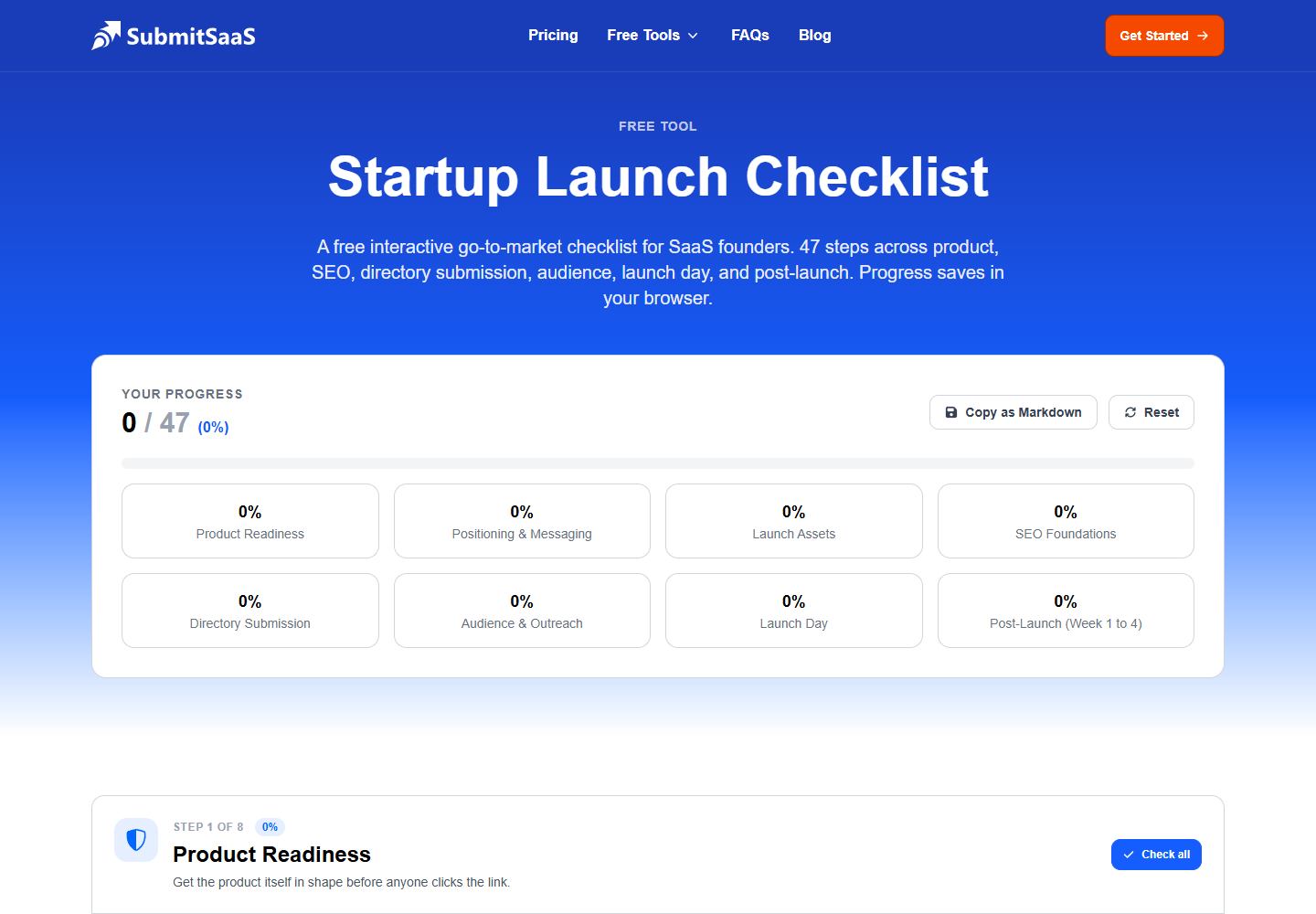
The SubmitSaaS startup launch checklist groups 47 steps into eight stages, with directory submission as its own stage after product readiness and SEO foundations. Screenshot from September 2026.
The free startup launch checklist tracks these items by stage and saves your progress in the browser, so you can tick them off over a few evenings.
Why Your Stage Sets the Timeline
Directory rules aren’t written around your launch date. They’re written around two questions: can a visitor use your product today, and is it new to the site’s audience? Rules and timings quoted from here on are as of November 2026, and platforms tweak them, so give the live page a glance before you plan around a number.
BetaList's criteria look for products new to its audience, whether on a waitlist, in beta or launched with little exposure, and allow up to two features (prelaunch and launch) at least a few weeks apart. Product Hunt's featuring guidelines favor products that are currently available and don't feature waitlisted products unless immediate access is provided. Evergreen directories such as SaaSHub and AlternativeTo publish their own rules on unreleased products, waitlist pages and betas. Our breakdown of [SaaS directory submission requirements](/blog/saas-directory-submission-sites) goes through each of those rule sets in detail.Two consequences shape the plan. Launch platforms are one-shot events, so spend them only when the product can convert the attention. Evergreen directories are standing pages that don’t care which day you submit, but their copy has a shelf life. A listing submitted at waitlist stage (“Join the early-access list”) is wrong everywhere once you launch, and plenty of founders never go back to rewrite it.
| Destination | Waitlist only | Private beta | Public launch | Watch out for |
|---|---|---|---|---|
| BetaList | If new to its audience | If new to its audience | If launched with little exposure | Two features at most, weeks apart |
| Product Hunt | Not featured | Not featured without immediate access | Eligible for featuring | Featuring is editorial |
| Show HN | No | Only if people can try it | Yes | Sign-up-only pages off topic |
| Evergreen SaaS directories | Usually not | Usually not | Usually | Rules differ; read each page |
| Review marketplaces | Not useful | Not useful | Once customers can review | Check current eligibility |
Key Takeaway: Spend a one-shot event only when the product can convert the attention, and submit an evergreen directory only when the copy will still be true in six months.
Lead Times: How Long Each Destination Takes
A timeline is only as good as its slowest step. Several destinations publish how far ahead you can book or how long their reviews take, and those numbers decide when you have to act. The figures below come from each platform’s own pages. Treat them as planning inputs, not promises: queues grow and shrink.
| Destination | When to act | Published timing |
|---|---|---|
| Product Hunt | Book within 30 days of your date | Goes live at midnight Pacific and runs the full day |
| Uneed | About two months out for the free line | Free date at least 50 days away; paid options faster |
| BetaList | Before the stage you want featured | Shown when you pick a plan and in the confirmation email |
| DevHunt (developer tools) | When you choose a launch week | New batch each week; $49 one-time to pick your week |
| AlternativeTo | Once the product is public | Free queue has no date; paid priority usually 1 to 2 business days |
| SaaSHub | At public launch | No stated time; missing competitors move you to the bottom |
| G2 | Two weeks before your first review invite | About 3 to 5 business days to verify; 1 to 3 to approve a claim |
| Chrome Web Store | Weeks before any extension listing | Most reviews take a few days; some take a few weeks |
| Apple App Store | Before any listing that links to the app | At least 50% reviewed in less than 24 hours; 90% in less than 48 |
| Slack Marketplace | After 10 active workspaces | Feedback within 10 business days; functional review up to 10 weeks |
Three patterns in that table shape the whole plan.
Free queues are the slow ones, and you don’t control their date. AlternativeTo’s FAQ says its normal queue holds several thousand apps, while paid priority submissions are usually reviewed within one to two business days and still don’t buy approval. SaaSHub’s submission page gives no review time but says a submission without listed competitors is slowed down and put to the bottom of the queue, so a half-finished form costs you weeks. BetaList’s help page says the expected timeline is shown when you choose a plan, so note it in your tracker the day you pay.
Platform stores gate everything that links to them. Chrome’s review process documentation says most extension reviews finish within a few days but can take up to a few weeks. Apple’s App Review page says it typically reviews at least 50% of submissions in less than 24 hours and 90% in less than 48 hours. Slack’s Marketplace review guide allows up to 10 business days for preliminary feedback and up to 10 weeks for the functional review of a new app. A directory listing that points to a store page you don’t have yet is a listing you’ll have to fix.
Review marketplaces have two steps, not one. G2’s create-a-profile page estimates about 3 to 5 business days for its research team to verify a requested product and 1 to 3 business days to approve a claim. Claim the profile at least two weeks before you plan to send the first review invitation.
Launch platforms book on their own windows. Product Hunt lets you schedule a launch from tomorrow up to 30 days ahead, so booking can wait until about a month out, but the preparation can’t. DevHunt’s FAQ describes a weekly batch for developer tools, with a one-time $49 launch that lets you choose your week; free listings get a permanent page with a nofollow link instead. For boards beyond these, our guide on where to submit after Product Hunt maps the wider field.
Count Backward From Your Anchor Date
- Fix the anchor. Name the day of your main launch event day 0 and schedule everything else relative to it.
- Put platform approvals first. If the product ships through an extension store, app store or host marketplace, plan for the slow end of its published range, then add a week for a rejection and resubmission.
- Place the free queues. Join lines whose date you can’t control as soon as the readiness checks pass. If a slot must land on a specific day, a paid date option is the lever, not repeated requests.
- Book the anchor. Product Hunt’s 30-day window means the booking happens around day -30; the asset work starts earlier.
- Back-time the review layer. Request or claim review-marketplace profiles two weeks before wave 3 begins.
- Keep a buffer week before day 0. A failed readiness check usually needs a few days of fixes, and you don’t want them in launch week.
Here’s how that plays out for a hypothetical browser extension with its anchor on Product Hunt. On day -60 it joins a free launch line, knowing the assigned date can’t come before day -10. On day -35 it submits to the Chrome Web Store, leaving room for a review that takes a few weeks plus one resubmission. On day -28 it schedules the Product Hunt launch. On day -7 it freezes copy and screenshots. Wave 1 starts on day 2, and every listing links to the approved store page or the product’s own site. The dates are illustrative. The order is the point.
Before Launch: Waitlist and Beta
If visitors can only leave an email address, you’re pre-launch, whatever the landing page says. That doesn’t mean you sit on your hands, but it does mean most doors are still shut.
BetaList may fit if you’re new to its audience; look at its submission options and decide whether to use the prelaunch feature now or save it for later. Communities you already take part in welcome feedback requests more than announcements. Company and social profiles can be set up now; on Crunchbase, for example, a registered user can create a company profile, which is separate from verifying that you represent the company.
Hold Product Hunt until access is immediate, Show HN until there’s something to try, and evergreen directories and review marketplaces until a public launch. A waitlist submitted there earns rejections, or worse, an approved listing for a product that doesn’t exist yet. Spend the pre-launch stretch on the things that make launch week smooth: your own domain, the asset kit, your communities and booking the slow launch queues. Our product launch checklist template covers the rest of the prep.
To a reviewer, an invite-only beta looks like a waitlist, so use it to collect evidence: workflows users rely on, quotable comments with permission, and customers willing to review you later through each platform’s own flow. Once anyone can sign up, more doors open. The Show HN guidelines describe it as a way to share something you built that people can try now.
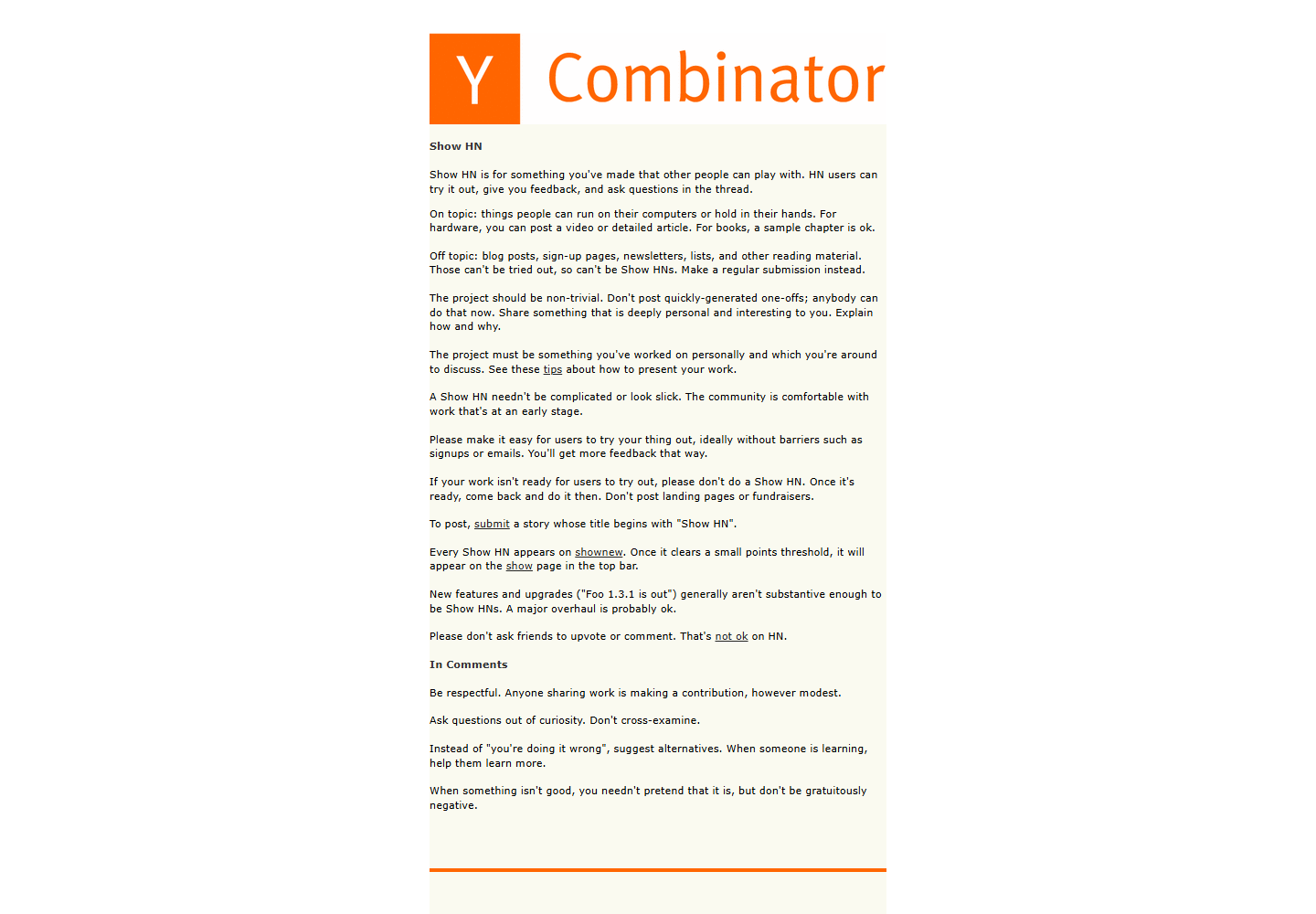
Show HN’s rules double as a readiness test: if people can’t try it yet, it isn’t ready for a discussion-heavy launch. Screenshot from September 2026.
If a listing says “beta,” say what that means, and add a tracker reminder to update it when you leave beta. Stale beta labels make a product look abandoned.
Launch Week: One-Shot Events, Separate Days
Launch week is where good plans go to die, usually because three events got stacked on one afternoon. Here’s how to keep them apart.
Book slow queues early. Some launch platforms run free queues longer than founders expect. Uneed’s pricing page, as of November 2026, says a free launch is assigned a date at least 50 days out, with a $19.99 fast-track of about 14 days and a $39.99 option to choose your date. Our lists of startup launch platforms and Product Hunt alternatives help you build the shortlist.
Pick one anchor and space the rest. Product Hunt, Show HN and community posts all need you in the comments. A Product Hunt launch normally goes live on the scheduled day, though Product Hunt may reschedule in exceptional cases, and featuring is a bonus, not a given. A practical pattern: Product Hunt first, Show HN a few days later once launch-day bugs are fixed, and community posts across the following week. Don’t ask anyone to upvote. Product Hunt’s promotion guide says asking for upvotes or rewarding them breaks its rules and can get a launch removed. Ask people to try the product and comment instead.
Choose the day by staffing, not by habit. Product Hunt’s guide to picking a date notes that weekdays usually bring more traffic and more competition, while weekends are quieter on both fronts, which can suit smaller teams and side projects. If only one founder can answer comments, a quieter day you can cover fully beats a busy day you can’t. Can’t staff a full launch day at all? Pick an anchor that matches your capacity, or skip it. A weekly board spreads the conversation over seven days, and a post in a community where you already take part needs less coverage than a homepage launch. Evergreen directories need no launch whatsoever, so you can start at wave 1 and save a launch for a major release when more people can help.
Staff each day like a support shift, and log every question visitors ask. Those questions are exactly what your directory descriptions should answer. Prepare the evergreen batch before launch but submit it in the days after, so confirmation emails don’t compete with launch comments for your attention.
A Day-by-Day Plan for Launch Week
This split keeps the conversations with you and pushes the form work into the days when launch traffic has calmed down. Shift the days to match your anchor.
| Day | Launch task | Directory task |
|---|---|---|
| -7 | Freeze copy, pricing and screenshots; test sign-up in a clean browser | Load wave 1 into the tracker with each submission URL |
| -1 | Final check of the launch page; brief whoever covers support | None |
| 0 | Anchor launch; answer every comment the same hour | None; log every question visitors ask |
| 1 | Fix what day 0 exposed; reply to late comments | Rewrite descriptions around the questions you logged |
| 2 to 3 | Community post where you already take part | Start wave 1 in daily batches |
| 4 to 5 | Show HN, if launch bugs are fixed | Continue wave 1; confirm emails the same day |
| 6 to 7 | Write up feedback and objections | Log every submission; mark pending reviews |
If your anchor is a weekly board rather than a daily one, stretch the plan. A DevHunt launch, for example, runs for the full week, so keep the launch-task column going for seven days and move wave 1 to the week after.
Your Startup Directory Submission Calendar
Copy this into a spreadsheet. Week 0 is your anchor launch. All told, the calendar covers 12 weeks after the anchor, plus up to 12 weeks of preparation before it for booking slow queues and passing the readiness checks. The long poles are the ones you don’t control: free launch lines that assign dates 50 or more days out, store reviews that can take weeks, and marketplace thresholds you have to earn. It’s a planning template, not a benchmark, so adjust the spacing to your queues and capacity, but keep the order.
| Week | Focus | Actions | Done when |
|---|---|---|---|
| -12 to -8 | Book slow queues | Check launch platform queues; book slots | Dates known for each platform |
| -8 to -4 | Pre-launch presence | Optional BetaList prelaunch; company profiles | Pre-launch listings submitted |
| -4 to -1 | Readiness and assets | Run readiness checks; write copy; set UTMs | All nine readiness items pass |
| 0 | Anchor launch | Product Hunt or other anchor; own channels | Launch live; comments answered |
| 1 to 2 | Wave 1 | Core SaaS and startup directories | Wave 1 submitted and logged |
| 3 to 6 | Wave 2 | Niche, vertical, AI, and alternatives sites | Wave 1 statuses checked; wave 2 sent |
| 6 to 12 | Wave 3 | Review platforms, long-tail, integrations | First reviews requested; wave 3 sent |
| Quarterly | Maintenance | Check live listings; update after triggers | Tracker statuses current |
Wave 1 draws on a curated list such as our best startup directories and best SaaS directories, plus the post-Product Hunt launch boards. Include a directory only if it accepts a just-launched product, is visibly maintained, and has follow-up you can handle this week. Wave 2 goes narrower: industry directories, AI directories if AI is central, and alternatives sites, using the comparisons that came up in launch comments. Wave 3 adds review marketplaces once customers can write honest reviews, plus integration marketplaces. Review-platform eligibility changes, so trust each platform’s own requirements over older roundups.
Why waves at all? Not because of some safe weekly pace for SEO. Google’s spam policies describe kinds of links that count as link spam, such as low-quality directory or bookmark site links and excessive link exchanges, rather than a speed limit. The quality of each directory matters far more than the week you submit to it. The reasons to spread the work are practical: you can only handle so many confirmation emails at once, and a rejection in wave 1 should improve wave 2.
Between waves, update your tracker with what’s live, pending and rejected. A wave 1 rejection often points to a fixable gap, such as a missing pricing page, that would otherwise repeat in wave 2.
Launched a year ago and worried you’ve missed the window? You haven’t. Evergreen directories care whether the product is real, available and fits their categories, not when you launched. You lose launch momentum and some novelty-driven platforms, nothing more. Run the readiness checks, start at wave 1, and time a bigger push around your next major release. Without the pre-launch half, the evergreen waves alone take roughly 12 weeks at a sustainable pace.
Pace Each Wave by Your Own Hours
Wave lengths in the calendar are ranges because the real limit is your time, not the directories. Time your first five submissions, including account creation and email confirmation, and use that average for the rest of the plan. As a hypothetical: if those five forms average 20 minutes each, a 30-directory wave 1 is about 10 hours of form work, or two hours a day for a week. The submission time calculator runs the same estimate with your own inputs.
Four habits keep a wave on schedule:
- Work in daily batches you can close the same day. Submit, confirm the email and log the status before you stop. A form left half-done is the one you forget.
- Fill every field the first time. Fields that look optional, such as competitors, can change your place in a queue, as SaaSHub’s rule shows.
- Edit instead of resubmitting. A second submission for the same product can create a duplicate that editors have to merge or reject. Many directories let you edit a pending or live entry; BetaList’s help page, for example, says most edits are approved automatically within minutes.
- Follow up once, on a date you set in advance. If a directory states a review time, wait until it has passed. If it doesn’t, a single polite check after about a month is a reasonable default. After that, mark the entry “no response” and move on.
For the form work itself, our walkthrough of the SaaS directory submission process has a routine you can run on every site, so wave 3 is as clean as wave 1.
Pro tip: Time your first five forms with a stopwatch, not a guess. That one number turns a vague “we’ll do directories next month” into a calendar you can actually keep.
How the Timeline Shifts by Product Type
The calendar assumes a web-based B2B SaaS. Other product types add a prerequisite, drop a destination or change what makes a good anchor.
| Product type | Extra prerequisite | What changes in the calendar |
|---|---|---|
| B2B SaaS | Public pricing, even a starting price | Default calendar; review marketplaces in wave 3 |
| Consumer or prosumer app | None beyond the readiness checks | Drop B2B review marketplaces; weight launches and alternatives |
| Developer tool | Docs and a free tier people can try | Show HN or a developer board can be the anchor |
| AI tool | A specific task, not a general chat wrapper | AI directories move up to wave 1 |
| Browser extension | Store approval | Store submission weeks before day 0 |
| Mobile app | Store approval and a real website | Store approval before any listing |
| Platform integration | The host marketplace’s thresholds | A separate track measured in months |
B2B review marketplaces skip two groups entirely. G2’s listing documentation says it doesn’t accept business-to-consumer products or products in alpha or beta development. So no, your beta can’t go on G2, and other review sites set their own rules. A consumer app should spend that effort on launch platforms, alternatives sites and communities instead.
Developer tools can anchor on a developer audience. A Show HN that people can try without heavy sign-up, or a weekly developer board, often reaches the right buyers better than a general launch. Have documentation and a free tier or sandbox ready before day 0, because that’s what a developer audience tries first.
AI tools need a clear task before any wave. AlternativeTo’s FAQ lists a thin wrapper around someone else’s model among its reasons to decline an app. Write the one specific job your tool does before wave 1, and put AI directories early if AI is the core of the product.
Extensions and mobile apps wait for the store. Use the review times in the lead-time table to place the store submission. Directories that require a real website still apply: SaaSHub’s submission page accepts mobile apps “with decent websites,” so the store page alone isn’t enough.
Integrations run on their own clock. A host marketplace such as Slack’s asks for installs on at least 10 active workspaces before it will review you, so treat the listing as a product milestone after launch, not a launch-week task.
When to Submit Again
The calendar ends at week 12, but your product doesn’t. Some changes only need edits to what’s already live; a few genuinely open new doors.
| Event | Update existing listings | Submit somewhere new? |
|---|---|---|
| Major release | Screenshots, description, tags | Relaunch where significant updates qualify |
| Rebrand or new domain | Everything, before anything else | Only after old listings are updated |
| Pricing change | Pricing fields and descriptions | Free-tool directories if a free plan ships |
| New platform or API | Mention it on core listings | Yes, platform-specific directories |
| New vertical | Add use cases where allowed | Yes, that vertical’s directories |
| Minor update | Usually nothing | No |
A rebrand is the one case where updating comes first: redirect the old domain, update every listing you control, then submit under the new name. A major release can justify revisiting launch platforms under their current relaunch rules, prepared like a first launch. On Product Hunt, the product page guide says that if the same link launched in the last two months, you’ll be asked to request a relaunch, and a returning product’s new launch is added to its existing product page. A browser extension, public API or new vertical opens categories that didn’t exist for you before, which is the clearest case for a fresh round.
Timeline Mistakes and How to Fix Them
Most timeline problems come from doing the right thing in the wrong week. These are the ones that take the longest to undo.
| Mistake | What it costs | Fix |
|---|---|---|
| Every launch on the same day | Thin answers in every thread | One anchor; others days apart |
| Store submission in launch week | Listings point to a page that isn’t live | Submit to the store weeks earlier |
| Free queue joined after launch | Assigned date lands long after the buzz | Join once readiness passes, or pay for a date |
| Product Hunt again within two months | A relaunch request instead of a launch | Wait for a major release |
| Review invites before the claim is approved | Customers land on a profile you can’t manage | Claim first, then invite |
| Waitlist copy left on live listings | Visitors think the product isn’t available | Update every listing in the launch week |
If you’ve already made that last mistake, fix it before adding anything new. Open your tracker, filter for listings submitted before launch, and edit each one through the directory’s edit or claim flow. Where a directory has no edit option, use its contact route and give the listing URL and the corrected text in one message. No tracker yet? Our guide to tracking directory submissions has a structure you can copy.
Worked Example: A Hypothetical Support-Inbox Startup
Let’s run the whole timeline once. Replybay, a hypothetical shared support inbox for small online stores, has two founders and no marketing hire. All details are illustrative.
On the waitlist, the founders submit only a BetaList prelaunch feature and spend the rest of the time on prep: their own domain, a listings inbox, and copy in three lengths. During an eight-store private beta, they skip Product Hunt and collect quotes and future reviewers. A month before launch, the readiness check fails on two items, no pricing page and placeholder terms, so they fix both before booking the date.
Launch week runs Product Hunt on day one, a community post on day three, and Show HN on day five after fixing a launch-day bug. Wave 1 covers about 30 core directories over the next two weeks, wave 2 adds e-commerce and support directories, and around week nine, wave 3 claims review profiles and asks the beta stores, now paying, for honest reviews.
Notice what they didn’t do. No evergreen listings while the product was a waitlist, no review profiles before there were customers to fill them, and no three launches on one day. Every step waited for the stage that made it useful.
Which Waves to Hand Off
Keep the one-shot launches with the founder. They’re conversations, and Show HN is for people sharing what they built. The evergreen waves are the repetitive part and the easiest to delegate.
SubmitSaaS, a done-for-you directory submission service, combines automation with human review and completes a package’s submissions within 48 hours, so you can time an order for the week after your launch events. That covers submitting, not approval: each directory reviews on its own schedule, and the Google Sheet report with screenshots documents the submitted work, so add your own live and follow-up columns. Packages are one-time payments starting at $60 for 60+ directories, and they’re all on the pricing page.
Map Your Stage, Then Book the Next Wave
You don’t need the whole 24-week plan today. You need to know where you are and what comes next.
- Name your stage honestly: waitlist, private beta, open beta, launched, or post-launch with customers.
- Run the nine readiness checks and fix failures before any evergreen submission.
- List only destinations that accept your stage, and park the rest in a “later” tab.
- Copy the calendar, add owners and dates for the next two waves, and decide which waves to delegate.
Do that, and launch day goes back to being about the conversation, not forty open tabs.